AI Workflow for Independent Consultants: From Tool Pile to One System
Using AI is not the same as having it built into the work. Here is how to find the one bottleneck worth fixing first.

Many independent consultants already use AI somewhere. A chat tool drafts the email. A recorder summarizes the call. The proposal still gets built by hand, and the follow-up still depends on memory. If you want an AI workflow for independent consultants that saves real time, the tools are rarely the problem. The connections between them are.
A 2026 Goldman Sachs survey shows the same gap across small business. Of 1,256 owners in the firm's small business education program, more than three quarters use AI to some degree. Only 14% have it across their core operations. The sample is program participants, not a random cross section, and it covers small business owners, not consultants alone. The pattern still deserves your attention.
Using AI is not the same as having an AI workflow
A tool does one job when you open it. A workflow connects steps, so work moves from one to the next and each step has an owner. A system is a set of workflows you can hand to someone else, or back to yourself in six months, and it still works.
An AI workflow is a repeatable sequence of steps. AI does defined parts of the work. A person reviews the output. The result lands where the next step starts.
Adding a tool is a purchase. Building a workflow is a design decision. I read the gap in those survey numbers as the distance between the two. The same survey lists a lack of technical expertise, a crowded tools market and data privacy as obstacles. More than 70% of respondents said more training and implementation help would benefit them.
Where a consulting practice loses time
Every practice runs the same five stages, whatever the specialty. Each stage has a repeat task that eats hours without using your expertise.
1. Attract. Turning a conversation or a post into a name in your pipeline.
2. Book. Getting from interest to a scheduled call without back and forth.
3. Propose. Turning call notes into a scoped proposal.
4. Deliver. Producing the work, the status updates and the handoffs.
5. Follow up. The check-in after delivery that can turn one project into the next.
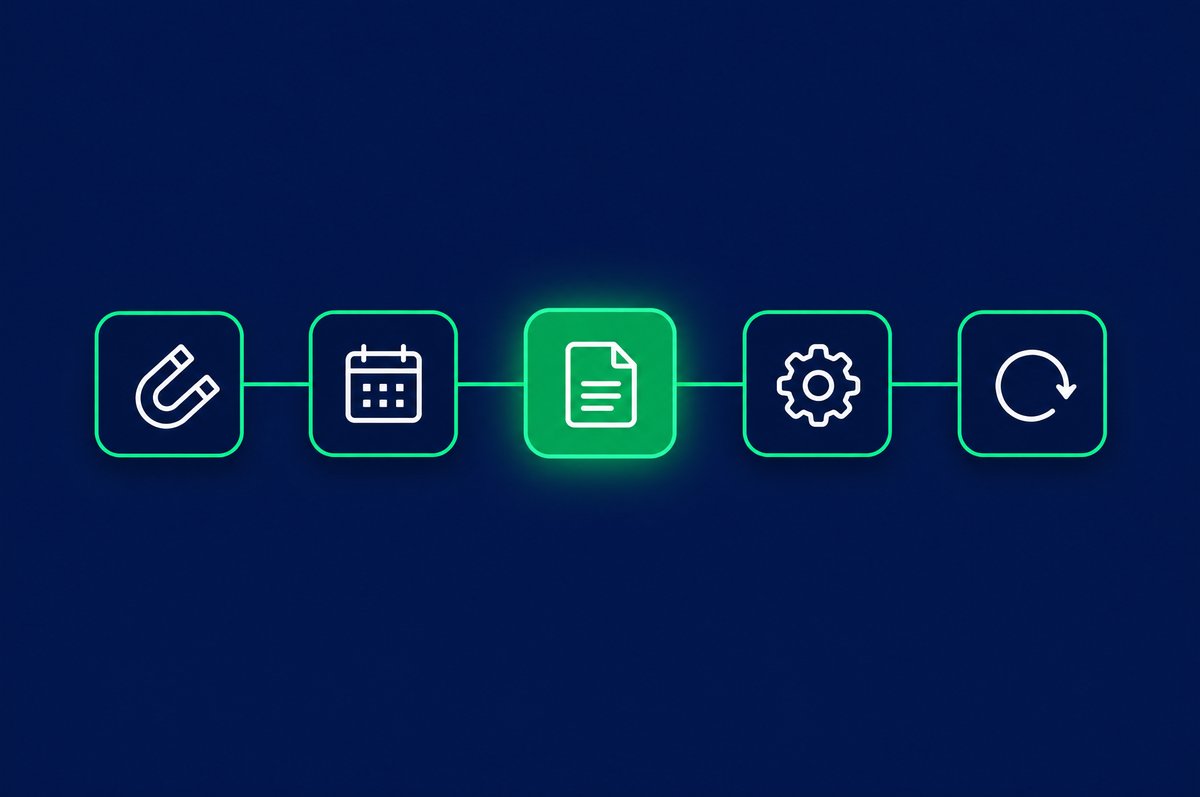
The glow on the third station is an example. Your bottleneck may sit anywhere in the chain. Find it before you buy anything.
The one-bottleneck test
Pick one stage. Ask five questions about its repeat task.
1. How often does it repeat? A task that happens once a quarter does not earn a system.
2. How many handoffs does it have? Count each time information moves between a person, a tool or a document.
3. Where does the data live today? If the answer is "in my head" or "in three inboxes," you found work to do first.
4. Who reviews the output? Someone must. If the answer is no one, do not automate that step yet.
5. What breaks if it fails? A late reminder is minor. A wrong figure in a client proposal is not.
The right first build repeats often, crosses many handoffs, lives in scattered places, has a clear reviewer and fails cheaply. Start there. Leave the rest alone.
An illustrative workflow, from discovery call to proposal draft
Illustrative workflow. Not a client result.
You finish a discovery call. The call notes land in one place that you control. An AI tool drafts a scope summary from those notes, using your own past proposals as the pattern. You read it, correct it and approve it. The approved text moves into your proposal template. A follow-up task appears on your calendar.
When I build a workflow like this with a client, you drive the clicks, I direct the work. The review step is the part that stays yours.
Client material is the sensitive part. The Goldman Sachs survey reports data privacy as a key concern for half of the firms that use AI. For a consultant the stakes run higher, because your notes hold a client's confidential information. Decide which tools may see client material before you connect anything. Check each tool's data terms and your own client agreements. Keep client files in accounts you own.
What stays with you
AI drafts, sorts and reminds. It does not carry your judgment or your client relationships. I build the review step into the workflow, so a person reads anything before it reaches a client. The expertise that clients pay for stays yours.
What a build looks like and who owns what
If you want help, the work starts with a paid diagnosis and build plan, credited toward an approved build. The diagnosis names the bottleneck, the tools you already pay for and the steps to change. If you approve, I build and test the workflow with you.
Depending on the bottleneck, the right answer can be a tool you already own that I configure, a connection between tools, a focused application or a website. I assume none of those until the diagnosis says so.
At handoff, you keep ownership of your accounts, your data and the deliverables. The proposal states what that includes and what the workflow costs to run.
To test your own bottleneck against the five questions, Book a Practice Fit Call. You can also read how Practice Systems works. If you are earlier in the move to independent work, my note on a business operating system for a solo practice covers the foundation.
If you run a Pittsburgh small business or sell homes
The same test works for you. Pick one stage, ask the five questions and find the repeat task. If you run a small business, start at the small business page. If you sell homes in Greater Pittsburgh, start at the realtor page. I work with local clients across Greater Pittsburgh.
Frequently asked questions
What is the difference between an AI tool and an AI workflow?
A tool does one job when you use it. A workflow connects several steps, so the work moves from one to the next. AI handles defined parts, a person reviews the output, and the result lands where the next step starts.
Who owns the workflow after handoff?
You do. You keep ownership of your accounts, your data and the deliverables. The proposal lists the accounts involved and what the workflow costs to run.
Does AI replace the consultant?
No. AI drafts, sorts and reminds. You keep the judgment, the client relationships and the final review.
How many AI tools does a solo consultant need?
It depends on the bottleneck. Start with the tools you already pay for. Add a new one only when the diagnosis shows a gap that those tools cannot fill.
Chris Dugan is a Pittsburgh AI advisor and the founder of Dugan AI, a solo advisory practice. 25 years in enterprise technology at Microsoft, Google, Oracle and Salesforce.